
Jul 7, 2026-Reviews
Planpoint Review - Interactive Floor Plans for Real Estate
We've tested Planpoint, the interactive plan viewer used by major developers to turn building renders into clickable maps, stacking plans, and interactive floor plans.
Welcome to this Planpoint review ✨
If you've ever shopped for a new condo or rental online, you know the drill: a PDF of floor plans, a spreadsheet of availabilities that's always out of date, and a phone number to call if you want to know whether unit 403 is still on the market. It's 2026, and most real estate is still marketed like it's a printed brochure.
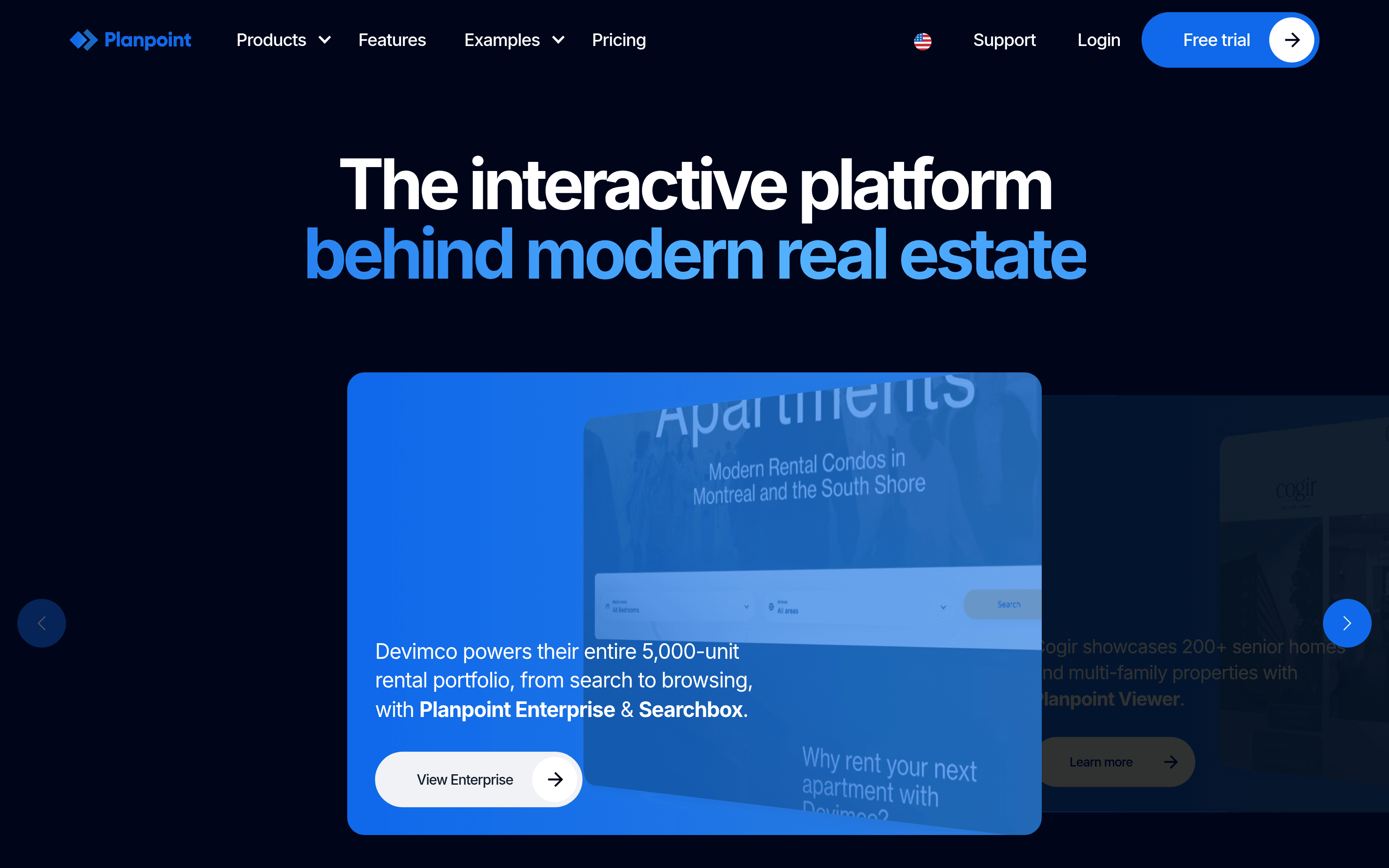
Planpoint goes straight at that problem. It's an interactive plan viewer used by major developers and property owners (Devimco, Cogir, Brigil, Forum, Mach and others) to turn a static building render into something you can actually click through: select a floor, see what's available, open a unit, read its exact layout, and book a visit, all without leaving the page. It embeds into any website and updates in real time.
The founder asked me to focus on three features in particular: the interactive floor plan, the stacking plan, and apartment mapping. So rather than just tour the marketing site, I spent time inside real, live Planpoint viewers deployed on developers' own websites to see how the whole flow actually feels. Let's dig in.
Getting Started & First Impressions
The thing that immediately sets Planpoint apart is that it isn't a website builder or a CRM bolted onto a plan viewer. It does one job (present a project's inventory interactively) and it does it deeply. You build a project once in a simple online editor, and then embed it anywhere: WordPress, Wix, Webflow, Squarespace, or plain HTML. The same project can be shown in five languages (English, French, Spanish, German, and simplified Chinese) from a single build.
What struck me most is that the whole thing is designed for non-technical users to manage. Availabilities, prices, layouts, images, and statuses can all be updated by a sales or marketing person, with no developer involved, and there's even an iOS/Android editor app so a salesperson can flip a unit to "sold" right after a signature and have it go live instantly. That real-time, self-serve angle is a big part of why teams pick it.
Apartment Mapping: The Building Becomes Clickable
This is where the magic starts. Instead of a flat photo of the building, Planpoint overlays the render with interactive zones, one per floor or per unit, so the whole exterior becomes a map. Hover over the top floor and it lights up, with a small tag telling you the floor number and how many units are available on it. Click, and you drop straight into that floor.
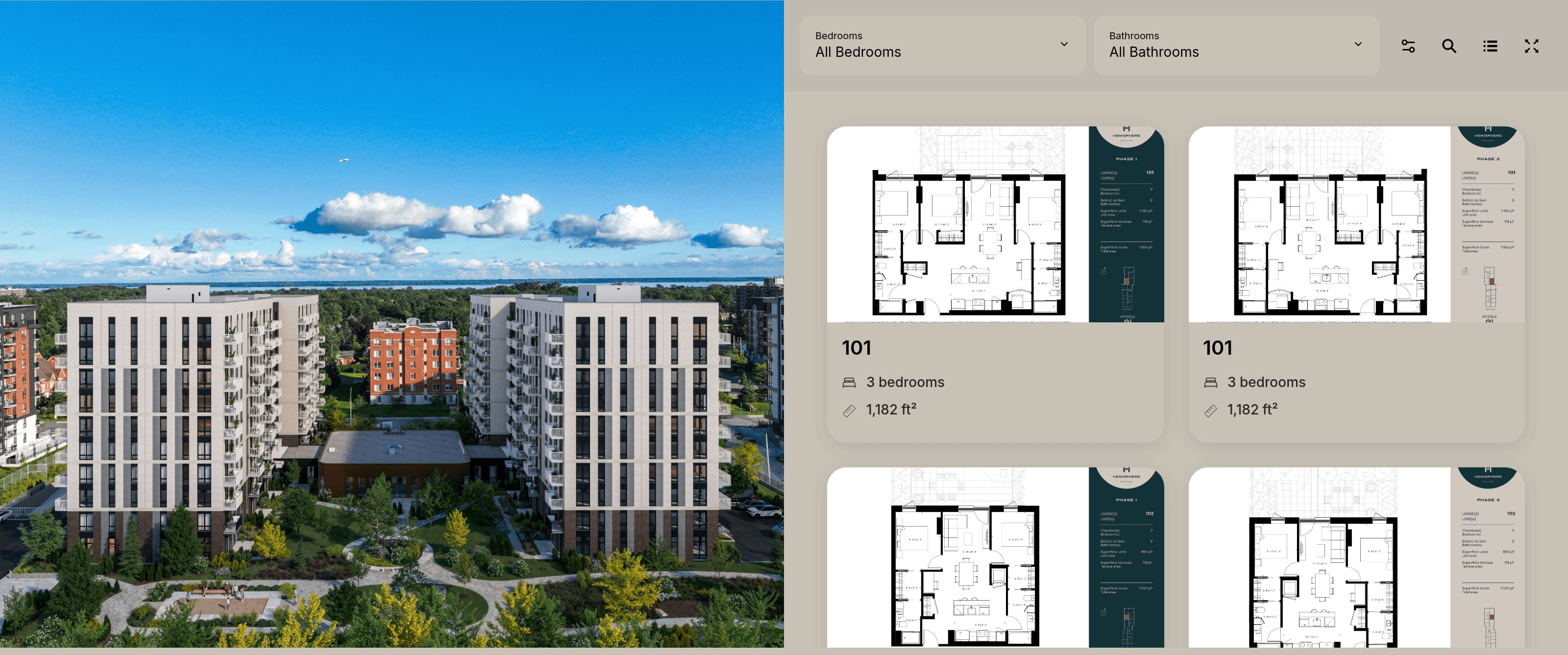
I tested this on a live rental project and it feels genuinely intuitive, exactly the mental model a buyer already has ("I want something high up, on the park side"). The render doubles as a 360° project view, so you can spin the environment and understand orientation, sightlines, and which side faces the water. For a marketing team, this is the difference between a visitor bouncing and a visitor exploring.
The Stacking Plan: Choosing a Floor at a Glance
The apartment mapping and the stacking plan work hand in hand. The stacking plan is the vertical logic of the building: pick a floor, and Planpoint shows you that floor's plate with every unit on it. Availability is colour-coded, so at a glance you can see what's sold, what's leased, and what's still open, and units are colour-keyed by bedroom count too (1, 2, or 3 bedrooms), with a legend to match.
Two filters sit at the top of this view, Bedrooms and Status, and they're the quiet workhorses of the whole product. Someone looking for a 2-bedroom that's available right now can filter the entire building down to exactly those units in two clicks. There's also a compass and a "back to project" control, so you're never lost in the navigation. The three layers (building → floor → unit) stay consistent and easy to move between, which is harder to pull off than it looks.
Interactive Floor Plans: The Unit Detail Page
Click any mapped unit and you land on the interactive floor plan, and this is the screen that does the selling. You get the full, dimensioned floor plan on the left, with a mini floor-locator that shows exactly where this unit sits on its floor (highlighted on a small plate, model name and all) and a compass for orientation. On the right sits everything a serious buyer wants: unit number, status, bedroom and bathroom counts, unit area, terrace area, total area, and a tidy list of inclusions (appliances, air conditioning, high-speed internet, 11-foot ceilings, and so on).
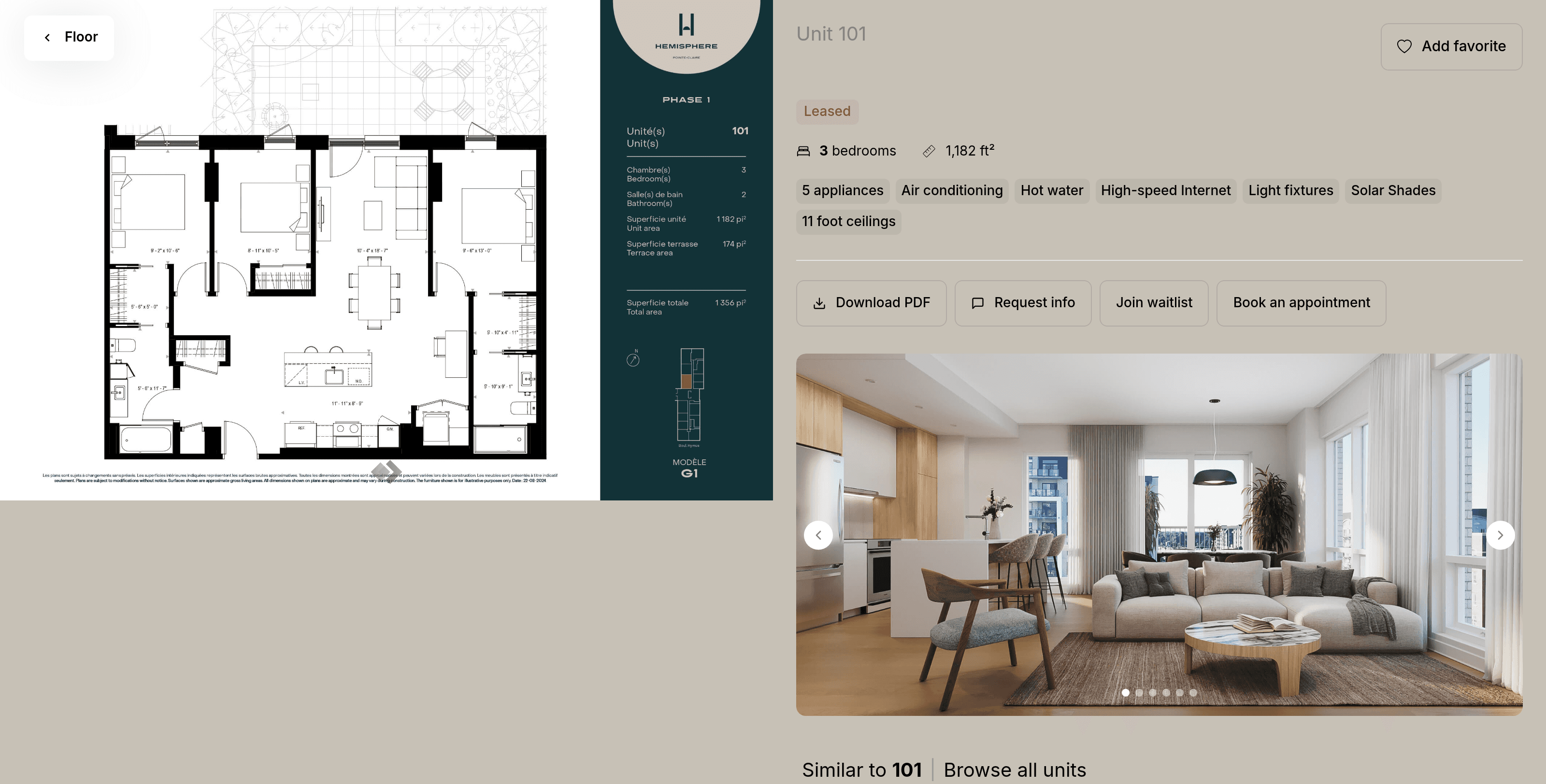
Below that there's an image gallery of interior renders and real photos, and a row of clear calls to action: Download PDF, Request info, Join waitlist, Book an appointment, plus an Add to favorites heart. A "Similar to this unit" strip lets you jump sideways to comparable layouts. Every unit also has its own unique URL, so a salesperson can text a prospect a link to one exact apartment, and because the pages are search-indexable, they can even surface directly in Google results. It's a small detail with real marketing consequences.
More Than Three Features
The three features I was asked to test are the core, but they sit inside a genuinely deep product. A few things worth calling out from the wider platform:
- A list view that flips the same inventory into a sortable, filterable table (unit, area, bedrooms, price, occupancy, status), ideal for the buyers who'd rather scan a spreadsheet than a render.
- Superframe, a touchscreen mode for TVs and tablets in the sales office, included at no extra cost.
- Advanced Analytics with unit popularity, demand by bedroom type, and heatmaps of which floors and units get the most attention.
- Enterprise + Searchbox for owners with large portfolios, letting clients search across an entire inventory on a global map (this is what powers Devimco's 5,000-unit rental portfolio).
- Extras like parking-space mapping, choice-of-finishes, day/night views, 3D tours (Matterport/Kuula), waiting lists with alerts, a Zapier integration to 6,000+ apps, and CRM/API connections into Salesforce.
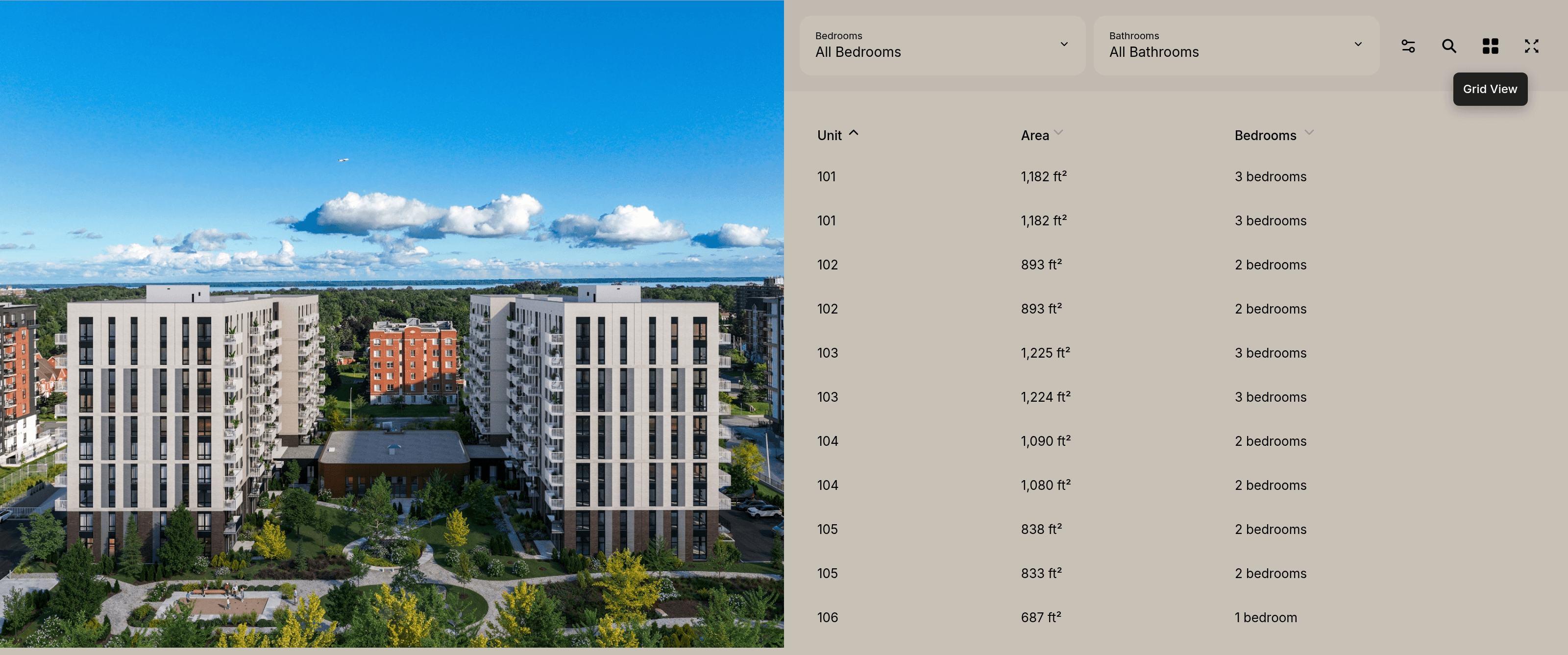
The point isn't that you need all of this on day one. It's that Planpoint has clearly been built alongside real developers over many years, and it shows in how many real-world edge cases it quietly handles.
Pricing & Plans
Planpoint's pricing is refreshingly simple and, importantly, per project with no contract, so you can spin a viewer up for a launch and stop when the project sells out. Every tier includes access to all features plus email and phone support; the plans differ only by unit count.
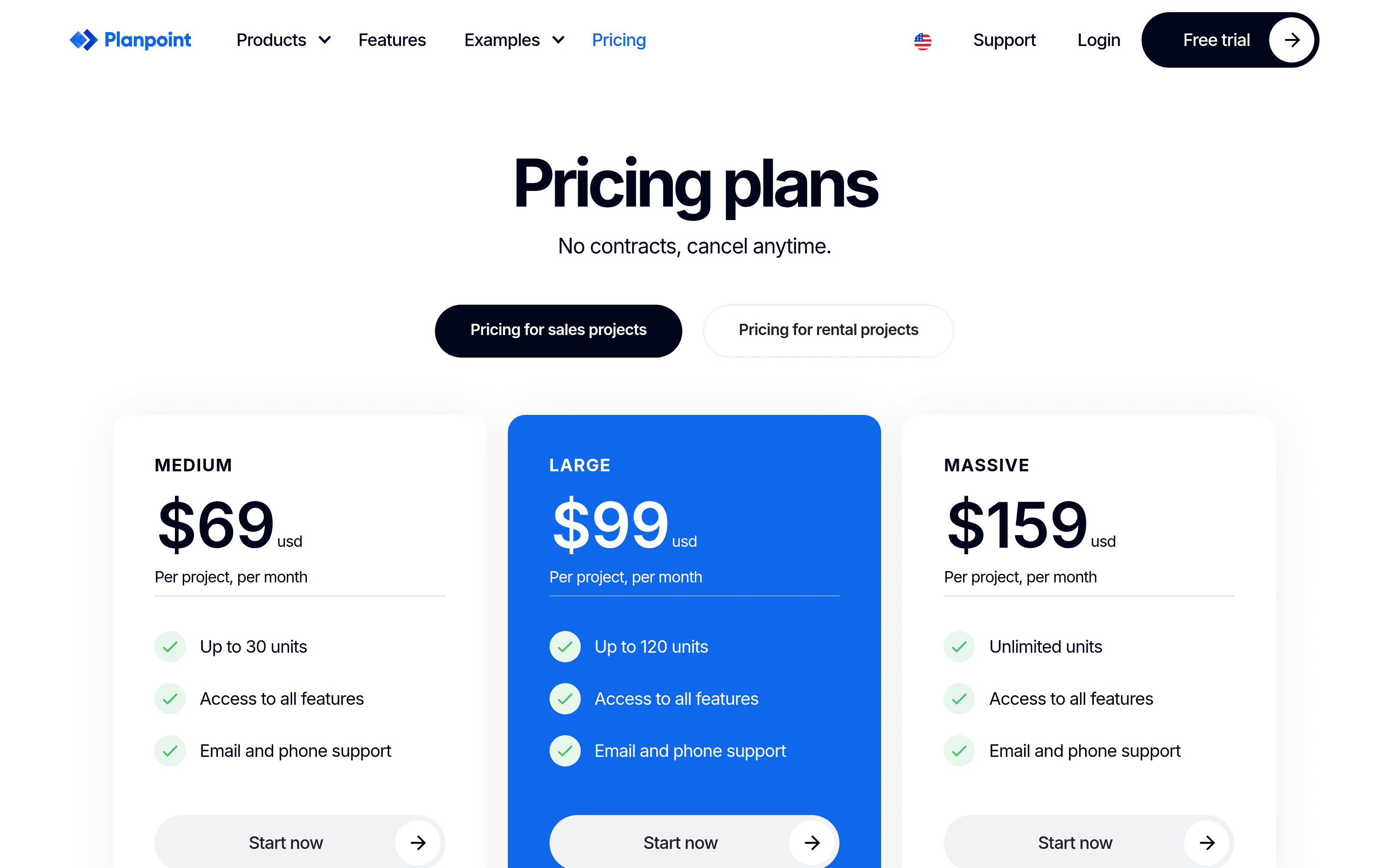
For sales projects the tiers are Medium at $69/mo (up to 30 units), Large at $99/mo (up to 120 units), and Massive at $159/mo (unlimited units). For rental projects, pricing is smartly based on vacant units rather than total ones (Small $49/mo up to 30 vacant units, Large $99/mo up to 120, Massive $139/mo unlimited), which means you're only paying in proportion to what you're actively marketing. Beyond that, an "Even Larger" tier offers custom quotes with up to 35% off for teams running many projects, plus priority support. There's a free trial, so you can build a real project before paying anything.
Who Should Use Planpoint?
Planpoint is a strong fit if you are:
- A developer or property owner launching condos, rentals, single-family homes, land, senior homes, or commercial space, and you want your plans to sell rather than just inform.
- A real estate marketing team that needs to update availabilities and prices in real time without waiting on a web agency.
- A sales team that wants one tool that works on the website, on the office touchscreen, and on a phone at a signing.
It's probably overkill if you're selling a single unit or two, where a simple listing does the job. But the moment you have a floor plan, multiple units, and availability that changes, this is exactly the category of tool that earns its keep.
Conclusion
That's the end of this Planpoint review. What I appreciate most is how coherent the core experience is: apartment mapping turns the building into something you want to click, the stacking plan makes choosing a floor effortless, and the interactive floor plan closes the loop with everything a buyer needs to take the next step. It's a rare piece of software that respects both the buyer browsing at midnight and the marketing manager who has to keep it all up to date.
If you market real estate and you're still sending PDFs, the easiest way to see the difference is to start a free trial and build one project, or browse the live examples to see how developers are already using it.
What I liked:
- Apartment mapping makes a building genuinely explorable, and the 360° view adds real context.
- The building → floor → unit flow (mapping, stacking plan, interactive floor plan) is consistent and hard to get lost in.
- Bedrooms and Status filters let a buyer narrow a whole tower to the right units in seconds.
- Non-technical teams can update availabilities and prices in real time, even from a phone app.
- Per-project pricing with no contract, and rental pricing based only on vacant units.
Things to keep in mind:
- It's a specialist tool for presenting inventory, not an all-in-one website or CRM (though it integrates with them).
- The deepest value comes once you've built out your project properly, which is a bit of upfront content work.
- The very large feature set means smaller teams will only ever use a fraction of it.
If your projects have plans, units, and availability that moves, Planpoint is well worth a look.
Related Articles
Reviews
Context.dev Review - One API for Scraping, Logos & Brand Data
We've tested Context.dev, a unified Scraping API, Logo API and Brand API that turns any domain into structured, AI-ready data. Markdown crawling for LLMs and RAG, a Clearbit-style Logo Link, and a full Brand API to personalize SaaS onboarding.